

































































Installments
Minimum amount for installment is 500 L.E


| Months | Monthly installment | Overall Cost | |
| 12 | 91 EGP | 1,086 EGP | |
| 18 | 62 EGP | 1,125 EGP |
| Months | Monthly installment | Overall Cost | |
| 12 | 91 EGP | 1,097 EGP | |
| 18 | 64 EGP | 1,156 EGP | |
| 24 | 50 EGP | 1,211 EGP | |
| 36 | 37 EGP | 1,317 EGP |
| Months | Monthly installment | Overall Cost | |
| 6 | 161 EGP | 966 EGP | |
| 12 | 92 EGP | 1,106 EGP |
| Months | Monthly installment | Overall Cost | |
| 12 | 95 EGP | 1,144 EGP | |
| 18 | 67 EGP | 1,214 EGP | |
| 24 | 54 EGP | 1,294 EGP |
| Months | Monthly installment | Overall Cost | |
| 6 | 161 EGP | 966 EGP | |
| 12 | 82 EGP | 985 EGP | |
| 18 | 55 EGP | 985 EGP | |
| 24 | 41 EGP | 985 EGP | |
| 36 | 27 EGP | 985 EGP |
| Months | Monthly installment | Overall Cost | |
| 12 | 94 EGP | 1,125 EGP |
| Months | Monthly installment | Overall Cost | |
| 12 | 91 EGP | 1,091 EGP | |
| 18 | 63 EGP | 1,130 EGP | |
| 24 | 49 EGP | 1,183 EGP |
| Months | Monthly installment | Overall Cost | |
| 6 | 161 EGP | 966 EGP | |
| 9 | 120 EGP | 1,076 EGP | |
| 10 | 109 EGP | 1,086 EGP | |
| 12 | 93 EGP | 1,115 EGP | |
| 18 | 65 EGP | 1,161 EGP | |
| 36 | 36 EGP | 1,299 EGP |
| Months | Monthly installment | Overall Cost | |
| 12 | 94 EGP | 1,125 EGP | |
| 18 | 66 EGP | 1,193 EGP | |
| 24 | 53 EGP | 1,265 EGP |
| Months | Monthly installment | Overall Cost | |
| 6 | 161 EGP | 966 EGP | |
| 12 | 91 EGP | 1,086 EGP |
| Months | Monthly installment | Overall Cost | |
| 12 | 89 EGP | 1,062 EGP | |
| 24 | 46 EGP | 1,101 EGP |
- Stock: In Stock
Note : For cib installment from 12 to 36 month interest calculated by bank
'Check in-store availability
×This game is available in 3 stores and can also be delivered to your home with cash-on-delivery option.
Store Madinty
Shop G ground Floor All Season Park Mall Madinty- Egypt
Ready for Pick Up On: Today
Store Working Hours:
Saturday to Wednesday: 10:00 AM – 10:00 PM
Thursday & Friday: 10:00 AM – 12:00 Midnight
متاح في هذا الفرع
Warehouse Fifth Settlement
21 Hay 4 District 3 Fifth Settlement New Cairo - Egypt
Ready for Pick Up On: Today
Store Working Hours: Saturday to Thursday 9:00AM - 5:00PM
متاح في هذا الفرع
Store Arabella
Shop LL-10 beside Mahmoud El Far Market -Arabella Mall Fifth Settlement New Cairo - Egypt
Ready for Pick Up On: Today
Store Working Hours:
Saturday to Wednesday: 10:00 AM – 11:00 PM
Thursday & Friday: 10:00 AM – 12:00 Midnight
غير متاح حالياً
Store Mall Of Arab
Shop G285 Near Gate 23 - Mall of Arabia 6 October City - Egypt
Ready for Pick Up On: Today
Store Working Hours:
Saturday to Wednesday: 10:00 AM – 11:00 PM
Thursday & Friday: 10:00 AM – 12:00 Midnight
متاح في هذا الفرع
More from this brand


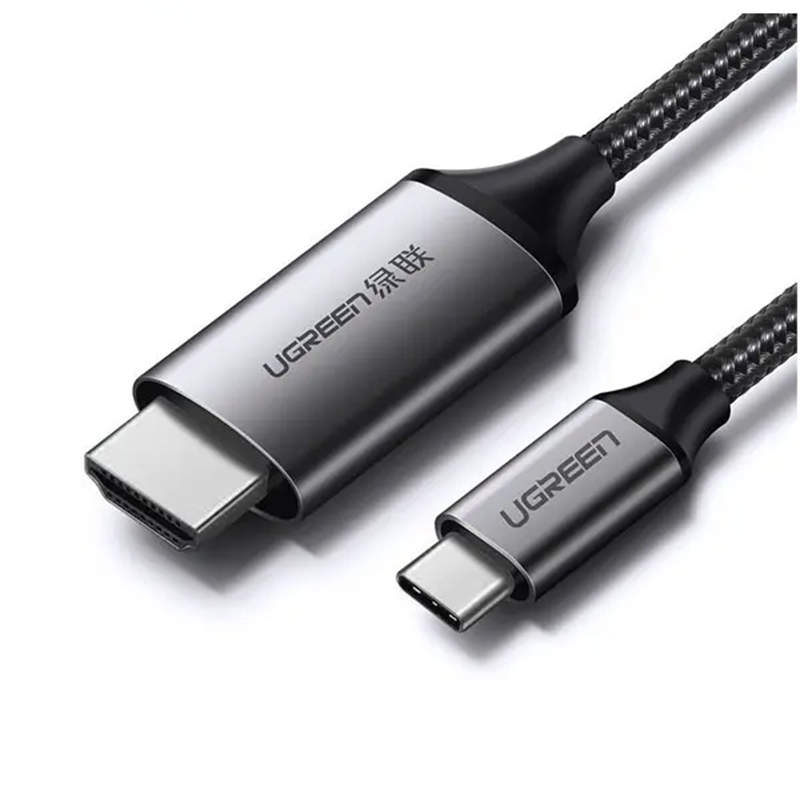
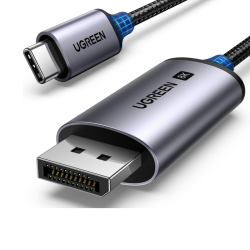
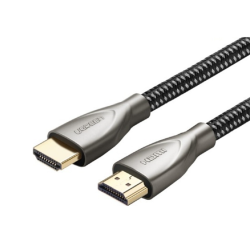
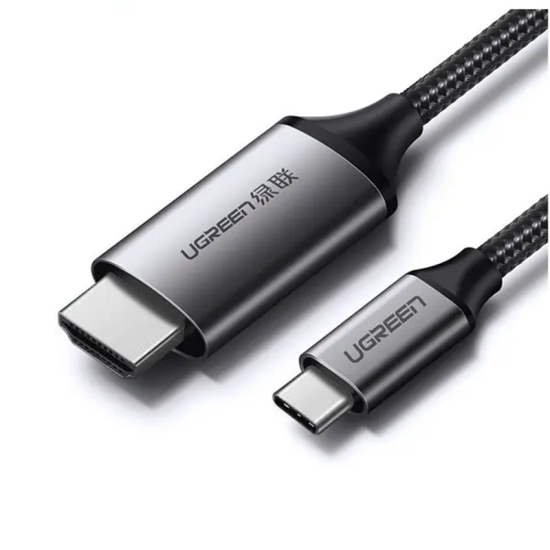
UGREEN MM142 50570 USB-C to HDMI Cable 1.5M – 4K@60Hz, HDR, 3D, HDCP 2.2, Thunderbolt 3/4 Compatible
Description
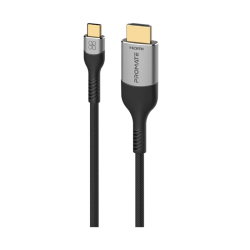
The UGREEN MM142 50570 is an active USB-C-to-HDMI cable designed to connect a compatible USB-C or Thunderbolt source directly to an HDMI television, monitor, projector, or AV receiver.
It supports resolutions up to 4K UHD at 60Hz and carries synchronized digital video and audio through a single connection. The integrated signal-conversion chipset eliminates the need for a separate USB-C adapter and HDMI cable.
Its nylon-braided jacket, aluminum-alloy connector housings, copper conductors, and multiple shielding layers provide a durable connection for entertainment, presentations, gaming, and extended desktop use.
Key Features
- USB Type-C Male to HDMI Type-A Male
- Active USB-C-to-HDMI conversion
- Supports 4K UHD at 60Hz
- Supports 1440p / QHD
- Supports Full HD 1080p
- HDR support
- 3D video support
- HDCP 2.2 and HDCP 1.4
- Synchronized digital audio and video
- Mirror and extended display modes
- MacBook clamshell-mode compatibility
- Samsung DeX support
- Huawei desktop/PC mode support
- DisplayPort Alternate Mode compatible
- Thunderbolt 3 and Thunderbolt 4 compatible
- Plug-and-play operation
- No external power required
- No software driver required
- Gold-plated connector contacts
- Aluminum-alloy connector housings
- Triple-layer signal shielding
- Pure-copper conductors
- Nylon-braided cable jacket
- Length: 1.5M / approximately 4.9ft
- Color: Gray/black
- Model: MM142
- SKU: 50570
- EAN: 6957303855704
4K@60Hz Ultra HD
The UGREEN 50570 supports detailed 4K UHD video at up to 60Hz when the source and display support the selected mode.
| Resolution | Maximum Supported Refresh Rate* |
|---|---|
| 4K / 3840 × 2160 | 60Hz |
| 4K UHD | 30Hz |
| 2560 × 1440 / QHD | Supported |
| 1920 × 1080 / Full HD | Supported |
| 720p / HD | Supported |
| 3D Video | Supported |
*Actual resolution, refresh rate, HDR availability, color depth, and chroma configuration depend on the source device, graphics hardware, USB-C port, operating system, HDMI display, and system settings.
USB-C DisplayPort Alt Mode Requirement
The USB-C port on the source device must support video output through one of the following:
- DisplayPort Alternate Mode
- Thunderbolt 3
- Thunderbolt 4
- Compatible USB4 video output
Charging-only and data-only USB-C ports will not work. The USB-C connector shape alone does not guarantee video capability.
Check the device specifications for DisplayPort Alt Mode, Thunderbolt, or external-display support before purchasing.
Active Signal Conversion
The UGREEN 50570 contains an active IC chipset that converts the DisplayPort video signal supplied through USB-C into HDMI.
Connection path:
USB-C computer, tablet, or phone → UGREEN 50570 → HDMI display
The chipset receives power from the source connection, so no external USB power adapter is normally required.
Unidirectional Operation
The cable works in one direction:
- USB-C connects to the source device.
- HDMI connects to the receiving display.
It cannot convert an HDMI source into USB-C video. It therefore cannot be used to connect:
- An HDMI computer to a USB-C monitor
- A PlayStation or Xbox to a USB-C display
- An HDMI streaming player to a Thunderbolt monitor
- An HDMI-output Blu-ray player to a USB-C display
HDR Support
The cable supports compatible HDR video signals, providing enhanced:
- Contrast
- Brightness
- Color reproduction
- Highlight detail
- Shadow detail
- Image depth
HDR requires compatible source hardware, content, operating-system settings, HDMI input, and display.
3D Video Support
The UGREEN 50570 supports compatible 3D video transmission between a suitable USB-C source and an HDMI-equipped 3D display.
A compatible source, appropriate content, and a 3D-capable television or projector are required.
HDCP 2.2 and HDCP 1.4
HDCP 2.2 and HDCP 1.4 support allows compatible protected video to pass through the connection.
HDCP must be supported throughout the system:
USB-C source → UGREEN 50570 → HDMI display
Streaming-service policies, operating-system restrictions, and application limitations can still affect protected playback.
Digital Audio and Video
The cable carries compatible digital audio and video simultaneously.
Audio can be sent to:
- Televisions
- HDMI monitors with built-in speakers
- Projectors with audio capability
- AV receivers
- Sound systems connected through the display
Available audio formats depend on the source, content, operating system, display, and receiver.
Mirror and Extended Display Modes
Mirror mode
Shows the same image on the source device and external HDMI display.
Extended mode
Uses the HDMI monitor as additional desktop workspace.
MacBook clamshell mode
Compatible MacBooks can work with the lid closed when their external power, keyboard, mouse, and display requirements are met.
Samsung DeX
Supported Galaxy smartphones and tablets can display a desktop-style DeX interface on the HDMI display.
Huawei desktop mode
Compatible Huawei devices can provide their supported desktop interface on an external screen.
Durable Construction
The UGREEN 50570 features:
- Pure-copper internal conductors
- Triple-layer signal shielding
- Gold-plated connector contacts
- Aluminum-alloy connector housings
- Reinforced connector joints
- Flexible nylon-braided exterior
This construction helps protect the connection against everyday bending, abrasion, oxidation, and signal interference.
Specifications
| Specification | Details |
|---|---|
| Brand | UGREEN |
| Model | MM142 |
| SKU | 50570 |
| Product Type | Active USB-C-to-HDMI cable |
| Source Connector | USB Type-C Male |
| Display Connector | HDMI Type-A Male |
| Direction | USB-C source to HDMI display |
| Required USB-C Feature | DisplayPort Alternate Mode |
| Maximum Resolution | 4K / 3840 × 2160 at 60Hz |
| 1440p / QHD | Supported |
| 1080p / Full HD | Supported |
| HDR | Supported |
| 3D Video | Supported |
| HDCP | HDCP 2.2 / 1.4 |
| Digital Audio | Supported |
| Mirror Mode | Supported |
| Extended Mode | Supported |
| Samsung DeX | Supported on compatible devices |
| Huawei Desktop Mode | Supported on compatible devices |
| Thunderbolt 3/4 | Compatible |
| External Power | Not required |
| Driver Installation | Not normally required |
| Device Charging | Not supported |
| Ordinary USB Data | Not supported |
| Conductor | Pure copper |
| Shielding | Triple-layer shielding |
| Connector Contacts | Gold-plated |
| Connector Housing | Aluminum alloy |
| Cable Jacket | Nylon braided |
| Cable Length | 1.5M / approximately 4.9ft |
| Color | Gray/black |
| EAN | 6957303855704 |
Mac Compatibility
Compatible USB-C and Thunderbolt-equipped devices can include:
- MacBook Pro
- MacBook Air
- MacBook
- Mac mini
- Mac Studio
- iMac
- iMac Pro
Maximum resolution and the number of external displays depend on the exact Mac model and processor.
Compatibility with the cable does not guarantee that every Mac can output 4K@60Hz or support multiple external monitors.
iPad and iPhone Compatibility
Compatible devices can include:
- iPad Pro with USB-C
- iPad Air with USB-C
- iPad mini with USB-C
- USB-C-equipped iPhone models
The available display mode depends on the device. Some provide screen mirroring, while supported iPad models can use an external display through Stage Manager.
Samsung Galaxy Compatibility
Compatible models with wired USB-C video output can include selected:
- Galaxy S24 series
- Galaxy S23 series
- Galaxy S22 series
- Galaxy S21 series
- Galaxy S20 series
- Galaxy S10 series
- Galaxy S9 and S8 series
- Galaxy Note 10 series
- Galaxy Note 9 and Note 8
- Galaxy tablets with video output
Not every Galaxy device supports wired video or Samsung DeX. Check the exact model before purchase.
Windows Compatibility
Suitable equipment can include:
- Dell XPS
- Dell Latitude
- Microsoft Surface
- HP Spectre
- HP EliteBook
- Lenovo ThinkPad
- Lenovo Yoga
- ASUS laptops
- Acer laptops
- Google Chromebooks
- Steam Deck
- Other computers with video-capable USB-C
The selected USB-C port must support DisplayPort Alt Mode or Thunderbolt video output.
Huawei Compatibility
Compatible equipment can include selected:
- Huawei MateBook laptops
- Huawei Mate phones
- Huawei P-series phones
- Huawei tablets with USB-C video output
Huawei desktop-mode availability and maximum resolution depend on the specific device.
Not Compatible With
This cable will not work with:
- Charging-only USB-C ports
- Data-only USB-C ports without video output
- Micro-USB devices
- USB-A ports
- Lightning devices without a separate compatible solution
- PlayStation consoles as the source
- Xbox consoles as the source
- Nintendo Switch Dock as the source
- Roku, Fire TV Stick, or Apple TV hardware as the source
- HDMI-output Blu-ray players
- USB-C monitors expecting video through their USB-C input
- Many smartphones that do not support wired video output
What This Cable Does Not Do
- It does not charge the connected device.
- It does not provide ordinary USB data transfer.
- It does not work from HDMI to USB-C.
- It does not split one source across several displays.
- It does not switch between multiple sources.
- It does not provide separate optical or analog audio.
- It does not add video output to an unsupported USB-C port.
- It does not support 4K@120Hz or 8K.
- It does not provide HDMI 2.1 gaming features such as VRR or ALLM.
Installation
- Connect the USB-C plug to the source device.
- Connect the HDMI plug to the television, monitor, projector, or AV receiver.
- Select the appropriate HDMI input on the display.
- Open the source device’s display settings.
- Select mirror or extended mode.
- Choose a resolution and refresh rate supported by both devices.
- Enable HDR if required.
A direct connection is recommended. Docks, couplers, extension cables, KVM switches, and additional adapters can lower the available resolution or cause signal-handshake problems.
Important Notes
To achieve 4K@60Hz, the complete signal path must support that mode:
Compatible USB-C video source → UGREEN 50570 → compatible HDMI display
If 4K@60Hz is unavailable:
- Verify that the USB-C port supports DisplayPort Alt Mode.
- Update the operating system and graphics driver.
- Connect directly without a hub or dock.
- Select an HDMI input that supports 4K@60Hz.
- Enable Enhanced HDMI, UHD Color, Deep Color, or the equivalent display setting.
- Test a lower resolution or refresh rate.
- Check the source device’s documented display limits.
Best For
- MacBook-to-HDMI monitor connections
- USB-C laptops
- Dell XPS and Microsoft Surface
- iPad external displays
- Samsung DeX
- Huawei desktop mode
- 4K televisions
- HDMI monitors
- Projectors
- Home-office workstations
- Classroom and business presentations
- Wired video playback from compatible phones
Why Choose the UGREEN 50570?
- Supports 4K UHD at 60Hz
- Supports HDR and 3D video
- Supports HDCP 2.2 and HDCP 1.4
- Carries synchronized digital audio and video
- Compatible with Thunderbolt 3 and Thunderbolt 4
- Supports mirror and extended desktop modes
- Requires no separate adapter or external power
- Durable nylon-braided exterior
- Aluminum-alloy connector housings
- Convenient 1.5-meter length
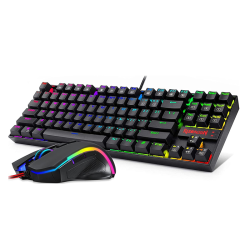
![Redragon S107 Gaming Keyboard, Mouse, Mouse pad, Mechanical Feel 104 Key RGB LED Keyboard, Wired 3200 DPI Mouse, Large Mouse Pad for PC Computer Games - [Keyboard Mouse Mouse Pad Set]](https://test.gamesworldegypt.com/image/cache/catalog/gamesworldegypt/accessories/RedragonS107GamingKeyboardMouseMousepad-250x250.jpg "Redragon S107 Gaming Keyboard, Mouse, Mouse pad, Mechanical Feel 104 Key RGB LED Keyboard, Wired 3200 DPI Mouse, Large Mouse Pad for PC Computer Games - [Keyboard Mouse Mouse Pad Set]")