



































































New
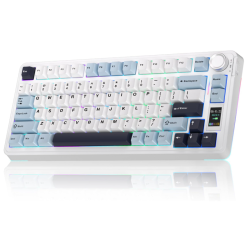
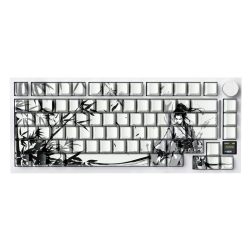
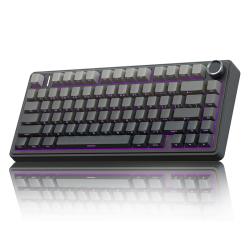
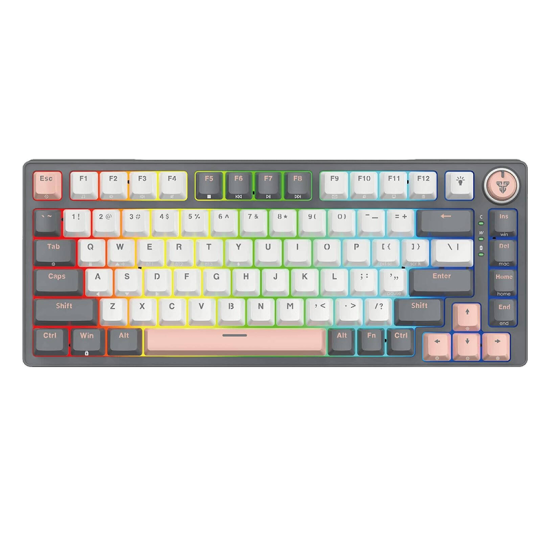
FANTECH Atom Pro83 75% Mechanical Gaming Keyboard – Red Switch (MK913, Saturn)

- Connection Type: Wired, Wireless (2.4GHz), and Bluetooth
- Switch Type: Mechanical (Red)
- Keyboard Size: 75% (83 keys)
- Lighting: RGB
- Language: English
- Color: Saturn (typically an orange, yellow, or multi-color theme)
Installments
Minimum amount for installment is 500 L.E


| Months | Monthly installment | Overall Cost | |
| 12 | 291 EGP | 3,491 EGP | |
| 18 | 201 EGP | 3,615 EGP |
| Months | Monthly installment | Overall Cost | |
| 12 | 294 EGP | 3,525 EGP | |
| 18 | 206 EGP | 3,714 EGP | |
| 24 | 162 EGP | 3,891 EGP | |
| 36 | 118 EGP | 4,232 EGP |
| Months | Monthly installment | Overall Cost | |
| 6 | 517 EGP | 3,103 EGP | |
| 12 | 296 EGP | 3,553 EGP |
| Months | Monthly installment | Overall Cost | |
| 12 | 306 EGP | 3,677 EGP | |
| 18 | 217 EGP | 3,900 EGP | |
| 24 | 173 EGP | 4,158 EGP |
| Months | Monthly installment | Overall Cost | |
| 6 | 517 EGP | 3,103 EGP | |
| 12 | 264 EGP | 3,165 EGP | |
| 18 | 176 EGP | 3,165 EGP | |
| 24 | 132 EGP | 3,165 EGP | |
| 36 | 88 EGP | 3,165 EGP |
| Months | Monthly installment | Overall Cost | |
| 12 | 301 EGP | 3,615 EGP |
| Months | Monthly installment | Overall Cost | |
| 12 | 292 EGP | 3,506 EGP | |
| 18 | 202 EGP | 3,631 EGP | |
| 24 | 158 EGP | 3,801 EGP |
| Months | Monthly installment | Overall Cost | |
| 6 | 517 EGP | 3,103 EGP | |
| 9 | 384 EGP | 3,458 EGP | |
| 10 | 349 EGP | 3,490 EGP | |
| 12 | 299 EGP | 3,585 EGP | |
| 18 | 207 EGP | 3,732 EGP | |
| 36 | 116 EGP | 4,176 EGP |
| Months | Monthly installment | Overall Cost | |
| 12 | 301 EGP | 3,615 EGP | |
| 18 | 213 EGP | 3,832 EGP | |
| 24 | 169 EGP | 4,065 EGP |
| Months | Monthly installment | Overall Cost | |
| 6 | 517 EGP | 3,103 EGP | |
| 12 | 291 EGP | 3,490 EGP |
| Months | Monthly installment | Overall Cost | |
| 12 | 284 EGP | 3,413 EGP | |
| 24 | 147 EGP | 3,537 EGP |
3,103 EGP
Ex Tax:
3,103 EGP
- Stock: In Stock
Note : For cib installment from 12 to 36 month interest calculated by bank
'Check in-store availability
×This game is available in 2 stores and can also be delivered to your home with cash-on-delivery option.
Store Madinty
Shop G ground Floor All Season Park Mall Madinty- Egypt
Ready for Pick Up On: Today
Store Working Hours:
Saturday to Wednesday: 10:00 AM – 10:00 PM
Thursday & Friday: 10:00 AM – 12:00 Midnight
متاح في هذا الفرع
Warehouse Fifth Settlement
21 Hay 4 District 3 Fifth Settlement New Cairo - Egypt
Ready for Pick Up On: Today
Store Working Hours: Saturday to Thursday 9:00AM - 5:00PM
متاح في هذا الفرع
Store Arabella
Shop LL-10 beside Mahmoud El Far Market -Arabella Mall Fifth Settlement New Cairo - Egypt
Ready for Pick Up On: Today
Store Working Hours:
Saturday to Wednesday: 10:00 AM – 11:00 PM
Thursday & Friday: 10:00 AM – 12:00 Midnight
غير متاح حالياً
Store Mall Of Arab
Shop G285 Near Gate 23 - Mall of Arabia 6 October City - Egypt
Ready for Pick Up On: Today
Store Working Hours:
Saturday to Wednesday: 10:00 AM – 11:00 PM
Thursday & Friday: 10:00 AM – 12:00 Midnight
غير متاح حالياً
More from this brand

1,712 EGP
Ex Tax: 1,712 EGP


Fantech Atom Pro83 MK913 75% Tri-Mode Mechanical Gaming Keyboard – Red Switch, Saturn
Description
The Fantech Atom Pro83 MK913 is a compact 75% mechanical gaming keyboard combining wireless freedom, wired performance, customizable mechanical switches, and RGB lighting.
Its 83-key layout retains dedicated arrow and navigation keys while requiring less desk space than a full-size keyboard. Three connection modes—2.4GHz wireless, Bluetooth 5.0, and wired USB-C—allow it to work across gaming PCs, laptops, tablets, and other compatible devices.
This Saturn edition comes equipped with smooth linear Red mechanical switches, full-key NKRO anti-ghosting, 5-pin hot-swappable switch sockets, 22 RGB lighting modes, side-panel lighting, a programmable control knob, adjustable feet, and a rechargeable 2,000mAh battery.
Key Features
- Compact 75% keyboard layout
- 83 keys
- Mechanical Red switches
- Smooth linear key response
- 5-pin hot-swappable switch sockets
- Compatible with suitable 3-pin and 5-pin mechanical switches
- Tri-mode connectivity
- Low-latency 2.4GHz wireless
- Bluetooth 5.0
- Detachable USB-C wired connection
- Connect up to three Bluetooth devices
- Full-key NKRO anti-ghosting
- 22 RGB lighting modes
- Additional side-panel RGB
- Per-key RGB lighting
- Programmable multifunction control knob
- Silicone sound-dampening layer
- Windows and macOS key modes
- Rechargeable 2,000mAh battery
- Adjustable feet
- Detachable USB cable
- Color: Saturn
- Model: MK913
Compact 75% Layout
The Atom Pro83 uses a space-saving 75% layout that retains frequently used functions without occupying the space required by a full-size keyboard.
It includes:
- Main alphanumeric section
- Function-key row
- Dedicated arrow keys
- Navigation keys
- Delete, Page Up and Page Down functions
- Programmable rotary control knob
The keyboard does not include a dedicated numeric keypad. Some secondary functions are accessed through the FN layer.
This format is suitable for gamers who want additional mouse space while retaining more dedicated keys than a 60% or 65% keyboard.
Tri-Mode Connectivity
2.4GHz Wireless
The included USB receiver provides a responsive wireless connection suitable for gaming and everyday computer use.
Use FN + Q to select 2.4GHz mode. If pairing is required, holding the combination for approximately five seconds activates receiver-pairing mode.
For the most stable gaming connection, connect the receiver directly to the computer or position it away from crowded USB 3.0 devices and other strong 2.4GHz wireless signals.
Bluetooth 5.0
The Atom Pro83 can save connections for as many as three Bluetooth devices.
Bluetooth channels are selected using:
FN + E– Bluetooth device 1FN + R– Bluetooth device 2FN + T– Bluetooth device 3
This makes it possible to move between a laptop, tablet, and another compatible device without repeatedly pairing the keyboard.
Bluetooth is convenient for productivity and portable devices. The 2.4GHz connection is generally preferable for latency-sensitive gaming.
Wired USB-C
The detachable USB-C cable provides a stable wired connection while charging the internal battery.
Holding FN + Y selects wired mode.
Wired mode is recommended for:
- Competitive gaming
- Battery-free operation
- Keyboard software
- Macro configuration
- RGB customization
- Firmware updates
Connection procedures are documented in the MK913 user manual.
Mechanical Red Switches
The Saturn Red Switch version uses linear mechanical switches designed to travel smoothly without a tactile bump or loud click mechanism.
Red switches are particularly suitable for:
- Fast repeated key presses
- FPS games
- Action games
- Quiet shared environments
- Users who prefer smooth key travel
- General typing and productivity
The actual sound level also depends on keycaps, stabilizers, desk surface, typing force, and the keyboard’s internal construction. Mechanical Red switches are typically quieter than Blue clicky switches but are not silent.
5-Pin Hot-Swappable Sockets
Hot-swappable sockets allow the installed mechanical switches to be removed and replaced without soldering.
They support suitable MX-style mechanical switches, including many:
- 5-pin switches
- 3-pin plate-mount switches
- Linear switches
- Tactile switches
- Clicky switches
Optical, low-profile, Hall-effect, and other electrically incompatible switches will not work simply because they have a similar appearance.
For safe replacement:
- Disconnect the USB cable.
- Switch off wireless operation.
- Remove the keycap using the included puller.
- Remove the switch vertically with the switch puller.
- Check that the replacement switch pins are straight.
- Align the pins and press the switch gently into the socket.
- Reinstall the keycap and test the key.
Avoid forcing a switch into the socket because bent pins or damaged hot-swap contacts may cause the key to stop registering.
Full-Key NKRO Anti-Ghosting
Full-key NKRO allows the keyboard to register multiple simultaneous key presses accurately.
This is useful for:
- Complex gaming commands
- Movement and ability combinations
- Rhythm games
- Fast typing
- Multi-key shortcuts
NKRO behavior can vary with the connected platform, Bluetooth implementation, and operating mode. Wired and 2.4GHz modes are recommended when maximum key-rollover performance is important.
RGB Lighting
The Atom Pro83 offers 22 lighting modes with adjustable brightness and animation speed.
Lighting controls include:
FN + Up Arrow– Increase brightnessFN + Down Arrow– Decrease brightnessFN + Left Arrow– Reduce effect speedFN + Right Arrow– Increase effect speedFN + Insert– Change spectrum effectFN + Delete– Backlight test mode
Additional side-panel RGB lighting gives the keyboard a wider ambient lighting effect across the desk.
Wireless battery life varies considerably with lighting brightness, effect speed, connection mode, and usage. Lowering or disabling RGB extends operating time.
Multifunction Control Knob
The integrated rotary knob provides convenient control without using additional keyboard shortcuts.
Through the Windows software, its function can be configured for compatible actions such as:
- System volume
- Lighting adjustment
- Side-lighting control
- Mute
- Play and pause
Available options can depend on the installed software and firmware version.
Silicone Sound Dampening
An internal silicone sound-absorbing layer helps reduce hollow case resonance and soften typing acoustics.
It does not make the keyboard silent, but it can provide a more controlled sound compared with a completely hollow plastic case.
Windows and Mac Modes
The keyboard supports Windows and macOS key-function modes, with the manual listing FN + Alt as the system-mode toggle.
Basic keyboard operation is available on compatible macOS devices, but the dedicated configuration software is designed for Windows.
Key legends and certain shortcuts may not exactly match every macOS, tablet, or mobile-device function.
Configuration Software
Fantech provides Windows software for the Atom Pro83 MK913.
Available functions include:
- Key reassignment
- Macro recording
- FN-layer customization
- RGB effect customization
- Brightness and animation settings
- Knob-function customization
- Profile management
The configuration software works in wired mode and is not officially available for macOS. Software, manual, and firmware resources are listed on Fantech’s keyboard download page.
Basic keyboard operation does not require software.
2,000mAh Rechargeable Battery
The built-in 2,000mAh battery supports wireless operation over Bluetooth or the included 2.4GHz receiver.
Actual battery runtime depends on:
- RGB brightness
- Side lighting
- Lighting effect
- Bluetooth or 2.4GHz operation
- Typing frequency
- Sleep settings
- Battery condition
The keyboard can be charged and used through its USB-C connection. A USB wall charger is not required when it is connected to a powered computer port.
Specifications
| Specification | Details |
|---|---|
| Brand | Fantech |
| Product Series | Atom Pro83 |
| Model | MK913 |
| Edition / Color | Saturn |
| Keyboard Type | Mechanical gaming keyboard |
| Form Factor | 75% |
| Number of Keys | 83 |
| Switch Type | Mechanical Red |
| Switch Feel | Linear |
| Hot-Swap Support | Yes, 5-pin |
| Anti-Ghosting | Full-key NKRO |
| Connectivity | 2.4GHz, Bluetooth 5.0, USB-C |
| Bluetooth Profiles | Up to 3 devices |
| Wired Interface | Detachable USB-C |
| Battery Capacity | 2,000mAh |
| Lighting | Per-key RGB |
| Lighting Modes | 22 |
| Side RGB | Yes |
| Control Knob | Programmable multifunction knob |
| Sound Dampening | Silicone layer |
| Adjustable Feet | Yes |
| Case Material | ABS |
| Weight | Approximately 830g |
| Manufacturer-Listed Size | Approximately 349 × 154 × 48mm |
| Software | Windows, wired mode |
| Mac Keyboard Mode | Yes |
| Numeric Keypad | No |
| Wrist Rest | Not listed |
| Water Resistance | Not specified |
Core specifications are confirmed on the official Fantech Atom Pro83 product page.
Some regional MK913 documentation lists the keyboard body closer to 330 × 134 × 42mm. Physical dimensions can therefore vary by revision or by measurement method and should be checked if exact sizing is required.
Compatibility
Suitable for compatible:
Computers
- Windows 11
- Windows 10
- Windows 8
- Windows 7
- macOS
- Desktop gaming PCs
- Gaming laptops
- Office computers
The Fantech configuration software is Windows-only.
Mobile Devices
- Android tablets
- Android smartphones
- iPad
- iPhone
- Other Bluetooth keyboard-compatible devices
Mobile-device keyboard shortcuts and language switching depend on the operating system.
Gaming Consoles
The keyboard may provide basic input on consoles and games that support standard USB or Bluetooth keyboards, including selected:
- PlayStation games and applications
- Xbox games and applications
- Nintendo Switch setups using a compatible USB connection
Console support is determined by the console and individual game. Connecting the keyboard does not add keyboard controls to games that do not support them.
Expected Package Contents
- Fantech Atom Pro83 MK913 keyboard
- 2.4GHz USB wireless receiver
- Detachable USB-C cable
- Keycap puller
- Switch puller
- User manual
Spare switches may vary by regional package and should not be promised unless physically present.
Important Notes
- The 75% layout does not include a dedicated numeric keypad.
- This listing is for the Red linear-switch Saturn version.
- Wireless runtime depends heavily on RGB brightness.
- Configuration software works only on Windows and in wired mode.
- Disconnect or power off the keyboard before replacing switches.
- Hot-swap sockets support compatible mechanical switches, not optical or Hall-effect switches.
- The keyboard is not advertised as waterproof.
- Bluetooth is best for multi-device productivity; 2.4GHz or wired mode is preferable for gaming.
- Store the 2.4GHz receiver carefully because wireless receiver replacements may require specific pairing.
- Keycap language and layout should be verified before sale; regional listings commonly show an English layout.
Best For
- FPS and competitive gaming
- Compact gaming desks
- Users needing additional mouse space
- Wireless gaming setups
- Multi-device productivity
- Laptop and tablet users
- Mechanical-keyboard customization
- Users who prefer smooth Red switches
- RGB gaming setups
- Work and gaming on the same keyboard
Why Choose the Fantech Atom Pro83 MK913?
- Compact 83-key 75% layout
- Three connection modes
- Stores three Bluetooth device connections
- Low-latency 2.4GHz wireless
- Stable wired USB-C operation
- Smooth Red mechanical switches
- 5-pin hot-swappable sockets
- Full-key NKRO anti-ghosting
- 22 RGB lighting modes
- Additional side-panel illumination
- Programmable control knob
- Internal silicone sound dampening
- Rechargeable 2,000mAh battery
- Windows software and macro support