







































































Installments
Minimum amount for installment is 500 L.E


| Months | Monthly installment | Overall Cost | |
| 12 | 907 EGP | 10,881 EGP | |
| 18 | 626 EGP | 11,266 EGP | |
| 24 | 491 EGP | 11,795 EGP |
| Months | Monthly installment | Overall Cost | |
| 6 | 1,605 EGP | 9,629 EGP | |
| 9 | 1,192 EGP | 10,730 EGP | |
| 10 | 1,083 EGP | 10,831 EGP | |
| 12 | 927 EGP | 11,123 EGP | |
| 18 | 643 EGP | 11,580 EGP | |
| 36 | 360 EGP | 12,958 EGP |
- Stock: Out Of Stock
Note : For cib installment from 12 to 36 month interest calculated by bank
'Check in-store availability
×This game is available in 0 stores and can also be delivered to your home with cash-on-delivery option.
Store Madinty
Shop G ground Floor All Season Park Mall Madinty- Egypt
Ready for Pick Up On: Today
Store Working Hours:
Saturday to Wednesday: 10:00 AM – 10:00 PM
Thursday & Friday: 10:00 AM – 12:00 Midnight
غير متاح حالياً
Warehouse Fifth Settlement
21 Hay 4 District 3 Fifth Settlement New Cairo - Egypt
Ready for Pick Up On: Today
Store Working Hours: Saturday to Thursday 9:00AM - 5:00PM
غير متاح حالياً
Store Arabella
Shop LL-10 beside Mahmoud El Far Market -Arabella Mall Fifth Settlement New Cairo - Egypt
Ready for Pick Up On: Today
Store Working Hours:
Saturday to Wednesday: 10:00 AM – 11:00 PM
Thursday & Friday: 10:00 AM – 12:00 Midnight
غير متاح حالياً
Store Mall Of Arab
Shop G285 Near Gate 23 - Mall of Arabia 6 October City - Egypt
Ready for Pick Up On: Today
Store Working Hours:
Saturday to Wednesday: 10:00 AM – 11:00 PM
Thursday & Friday: 10:00 AM – 12:00 Midnight
غير متاح حالياً
More from this brand


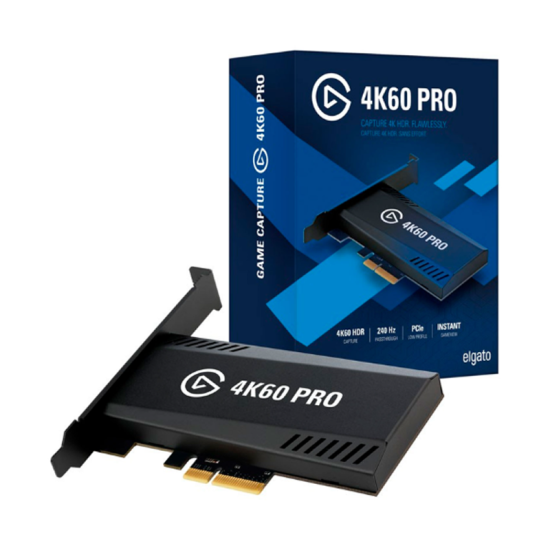
Elgato 4K60 Pro MK.2 Internal PCIe Capture Card – 4K60 HDR10 Recording & Lag-Free Passthrough (Open Sealed)
Description
The Elgato 4K60 Pro MK.2 is an internal PCIe capture card designed for high-quality console capture, dual-PC streaming and professional gameplay recording. It can capture and pass through video at up to 4K resolution at 60fps with HDR10 while providing a responsive, lag-free HDMI output to a compatible gaming monitor or television.
It also supports high-refresh-rate formats such as 1440p at up to 144Hz and 1080p at up to 240Hz within HDMI 2.0 bandwidth. Its onboard HDR-to-SDR tone mapping allows users to play in HDR while producing an SDR feed for streaming software.
Key Features
- Internal PCIe capture card
- PCIe 2.0 x4 interface
- HDMI 2.0 input and output
- Up to 18Gbps HDMI bandwidth
- Capture up to 4K at 60fps
- HDR10 capture and passthrough
- Lag-free HDMI passthrough
- Up to 1440p at 144Hz
- Up to 1080p at 240Hz
- 1080p and 1440p 120Hz console support
- Variable Refresh Rate passthrough
- Onboard HDR-to-SDR tone mapping
- Instant Gameview low-latency preview
- Multi-app access
- AVC/H.264 and HEVC/H.265 recording
- Full-height and low-profile PC compatibility
- Compatible with PS5, PS4, Xbox Series X|S, Xbox One, Nintendo Switch and PC
- Designed for Windows desktop computers
- Condition: Open Sealed
4K60 HDR10 Capture
The 4K60 Pro MK.2 can receive, pass through and record video at up to 3840 × 2160 resolution at 60 frames per second.
HDR10 support allows compatible Windows systems to record 10-bit HDR footage from suitable consoles, gaming PCs and other unencrypted HDMI sources.
For HDR recording through Elgato 4K Capture Utility, an NVIDIA GeForce GTX 10-series or newer graphics card is required. HDR recordings use the HEVC/H.265 format.
Lag-Free HDMI Passthrough
Connect the gaming source to the card’s HDMI input, then connect the HDMI output to a monitor or television. This allows gameplay to appear directly on the display without relying on the software-preview window.
The normal connection layout is:
Console or Gaming PC → Elgato 4K60 Pro MK.2 → Monitor or TV
A second HDMI cable is required for passthrough. One Premium High Speed HDMI cable is included in the original retail package.
Supported Resolutions and Refresh Rates
| Input or Passthrough Format | Support |
|---|---|
| 4K / 2160p at 60Hz | Yes |
| 4K / 2160p at 60Hz HDR10 | Yes |
| 4K / 2160p at 120Hz | No |
| 1440p at 144Hz | Supported |
| 1440p at 120Hz | Supported |
| 1440p at 60Hz | Supported |
| 1080p at 240Hz | Supported |
| 1080p at 120Hz | Supported |
| 1080p at 60Hz | Supported |
| 720p at 60Hz | Supported |
High-Refresh Gaming Capture
The card supports high-refresh gaming at lower resolutions, including:
- 1440p at up to 144Hz
- 1440p at 120Hz
- 1080p at up to 240Hz
- 1080p at 120Hz
For PlayStation 5 and Xbox Series X|S, 1080p120 and 1440p120 can be captured and passed through when the connected console and display support the selected format.
The card uses HDMI 2.0 and therefore cannot pass through or capture 4K at 120Hz. Users requiring 4K120 or other HDMI 2.1 formats need an HDMI 2.1 capture device.
HDR-to-SDR Tone Mapping
Onboard tone mapping allows users to play through the card in 4K60 HDR while supplying an SDR video feed to compatible streaming software.
This is useful when:
- The gaming display supports HDR
- The streaming platform uses SDR
- The recording and streaming workflows require different formats
- An SDR preview is needed on a non-HDR display
Variable Refresh Rate Support
With updated firmware, the 4K60 Pro MK.2 supports passthrough for:
- HDMI Forum VRR
- AMD FreeSync
- G-SYNC-compatible operation
Recording Formats and Bitrates
Using Elgato 4K Capture Utility, the card supports:
| Recording Format | Maximum Listed Bitrate |
|---|---|
| AVC/H.264 at 4K60 | Up to 140Mbps |
| HEVC/H.265 HDR at 4K60 | Up to 105Mbps |
Actual bitrate, storage consumption and recording performance depend on the selected software, encoder, graphics card and computer hardware.
Compatible Sources
Suitable for unencrypted HDMI output from:
- PlayStation 5
- PlayStation 5 Slim
- PlayStation 5 Pro at supported HDMI 2.0 modes
- PlayStation 4
- PlayStation 4 Slim
- PlayStation 4 Pro
- Xbox Series X
- Xbox Series S
- Xbox One
- Xbox One S
- Xbox One X
- Nintendo Switch Dock
- Nintendo Switch 2 at supported HDMI modes
- Gaming PCs
- Dual-PC streaming systems
- Cameras with clean HDMI output
- Other unencrypted HDMI sources
HDCP-protected video cannot be captured. HDCP normally needs to be disabled in the PlayStation system settings for gameplay capture, and protected streaming applications still cannot be recorded.
Software Compatibility
The card can be used with supported Windows capture and streaming applications, including:
- Elgato 4K Capture Utility
- OBS Studio
- Streamlabs Desktop
- XSplit Broadcaster
- Other compatible Windows video-capture applications
Available resolutions, HDR functionality and encoding options can vary between applications.
Recommended System Requirements
| Component | Requirement |
|---|---|
| Operating System | Windows 10 64-bit or newer |
| Intel Processor | 6th-generation Core i7 or better |
| AMD Processor | Ryzen 7 1700, Ryzen 5 3600 or better |
| Memory | 8GB RAM or more |
| Memory Configuration | Dual-channel recommended/required by Elgato specification |
| PCIe Slot | Physical x4, x8 or x16 |
| PCIe Bandwidth | PCIe 2.0 x4 or better |
| NVIDIA GPU for 4K60 HDR | GeForce GTX 10-series or newer |
| NVIDIA GPU for 4K60 SDR | GeForce GTX 950 or newer |
| Storage | High-speed SSD recommended for high-bitrate 4K recording |
Specifications
| Specification | Details |
|---|---|
| Brand | Elgato |
| Product | Game Capture 4K60 Pro MK.2 |
| Product Type | Internal capture card |
| Computer Interface | PCIe 2.0 x4 |
| Compatible Physical Slots | PCIe x4, x8 or x16 |
| Video Input | HDMI 2.0 |
| Video Output | HDMI 2.0 lag-free passthrough |
| HDMI Bandwidth | Up to 18Gbps |
| Maximum Standard Input | 3840 × 2160 at 60Hz |
| Maximum Standard Capture | 4K at 60fps |
| HDR | HDR10 capture and passthrough |
| High-Refresh Support | 1440p144 and 1080p240 |
| Console 120Hz Support | 1080p120 and 1440p120 |
| 4K120 Support | No |
| VRR Passthrough | HDMI Forum VRR, FreeSync and G-SYNC-compatible |
| VRR Range | Approximately 48–120Hz |
| Video Encoding | AVC/H.264 and HEVC/H.265 |
| HDR-to-SDR Tone Mapping | Yes |
| Multi-App Access | Yes |
| Power Consumption | 12V at 500mA, approximately 6W |
| Bracket | Full-height installed |
| Additional Bracket | Low-profile bracket included |
| Laptop Compatibility | No |
| macOS Compatibility | Not officially supported |
| Condition | Open Sealed |
PCIe Compatibility
The card requires more than a slot that merely looks large enough. The selected motherboard slot must provide at least PCIe 2.0 x4 electrical bandwidth.
Some motherboards reduce or disable PCIe lanes when:
- An M.2 SSD is installed
- Multiple expansion cards are installed
- A second graphics card is present
- SATA or chipset resources are shared
- The slot operates electrically at x1 speed
A physical x16 slot can be used, but it must supply sufficient active PCIe lanes. A slot operating at x1 is not adequate and may cause green, distorted, duplicated or missing video.
Audio Support
The card captures standard stereo Linear PCM audio through HDMI.
Dolby, DTS and other compressed multichannel digital formats are not captured by the hardware. For consoles, set the HDMI audio output to stereo or Linear PCM when audio is missing from recordings.
Package Contents
The original retail package should include:
- Elgato Game Capture 4K60 Pro MK.2
- Full-height PCIe bracket, preinstalled
- Low-profile PCIe bracket
- Premium High Speed HDMI 2.0 cable
- Documentation, if supplied
A second HDMI cable is required when using passthrough to a monitor or television.
Installation Overview
- Shut down and unplug the desktop computer.
- Open the computer case.
- Identify a PCIe x4, x8 or x16 slot with at least x4 electrical bandwidth.
- Install the full-height or low-profile bracket as required.
- Insert the card firmly into the PCIe slot.
- Secure the bracket to the computer case.
- Close the case and start Windows.
- Install the latest Elgato software, drivers and firmware.
- Connect the console or source to HDMI IN.
- Connect HDMI OUT to the gaming monitor or television.
- Select the card in Elgato 4K Capture Utility or compatible streaming software.
Open Sealed Inspection Checklist
Because this unit is sold as Open Sealed, verify the following:
- Confirm it is the smaller 4K60 Pro MK.2, not the original 4K60 Pro.
- Inspect the PCIe contacts for scratches, corrosion or damage.
- Check the circuit board for cracks, missing components or repair marks.
- Inspect both HDMI ports for bent contacts or looseness.
- Confirm the full-height bracket is installed.
- Verify the low-profile bracket is included.
- Confirm the original HDMI cable is present.
- Install the card in a PCIe slot operating at x4 bandwidth or higher.
- Verify that Windows detects the exact MK.2 model.
- Update the card’s firmware when required.
- Test HDMI input and output.
- Test both capture and passthrough.
- Record a sample at 1080p60.
- Test 4K60 capture when suitable equipment is available.
- Test HDR capture with compatible hardware.
- Verify stereo audio capture.
- Check for green, distorted or interrupted video.
- Monitor the card for excessive heat or instability.
- Inspect the original box and internal packaging.
- Confirm seller warranty coverage separately.
Important Notes
- This is an internal desktop-PC capture card.
- It does not work as a normal external USB capture device.
- It is not suitable for laptops.
- A PCIe x1 connection does not provide sufficient bandwidth.
- HDMI input must be unencrypted; HDCP-protected content cannot be captured.
- The card uses HDMI 2.0, not HDMI 2.1.
- It does not support 4K120 passthrough or capture.
- Multichannel Dolby and DTS audio capture is not supported; use stereo Linear PCM.
- HDR recording requires compatible Windows hardware and software.
- High-refresh formats may depend on EDID and display compatibility.
- Controllers, consoles, monitors and additional HDMI cables are not included.
- Streaming and recording performance depends on the complete PC configuration.
- Seller warranty for an Open Sealed product should be confirmed separately.
Best For
- 4K60 gameplay recording
- HDR10 gameplay capture
- PlayStation 5 streaming
- Xbox Series X|S streaming
- Nintendo Switch recording
- Dual-PC streaming setups
- High-refresh 1080p and 1440p capture
- OBS Studio users
- Content creators and livestreamers
- Desktop PCs with an available PCIe x4 or faster slot
Why Choose the Elgato 4K60 Pro MK.2?
- Captures up to 4K60 with HDR10.
- Provides responsive lag-free HDMI passthrough.
- Supports 1440p144 and 1080p240 signals.
- Supports 1080p120 and 1440p120 console gameplay.
- Includes onboard HDR-to-SDR tone mapping.
- Offers multi-application access for simultaneous recording and streaming.
- Uses a fast internal PCIe connection.
- Includes full-height and low-profile mounting options.
- Works with popular streaming and recording software.
- Ideal for high-quality console and dual-PC content creation.